
Manage every furniture installation projectfrom start to finish.
Keep scope, contacts, labor, product, files, daily reports, punch, and sign-off on the same project—so your team is not digging through texts and spreadsheets to figure out what is happening.
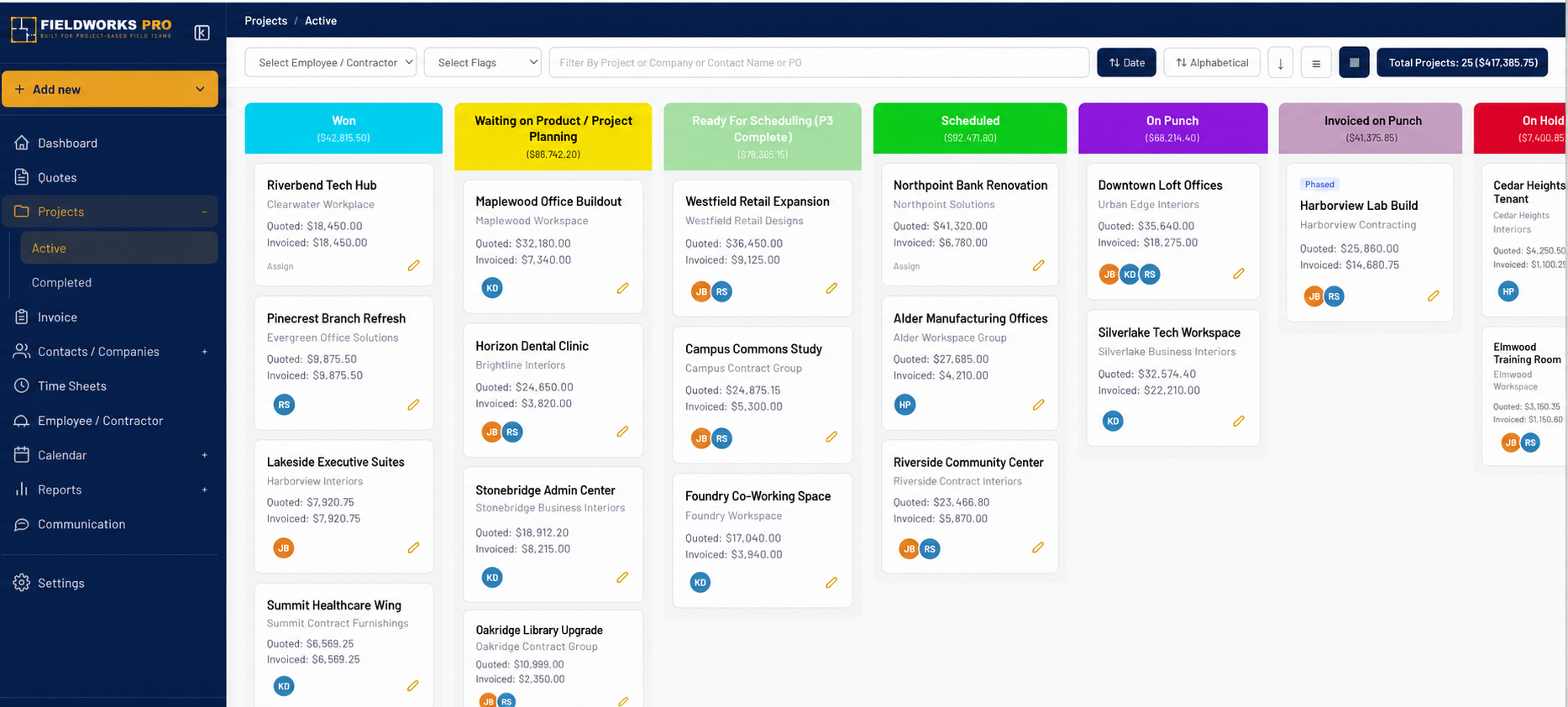
Stop managing the job from five different places.
Your project manager should not need one app for plans, a spreadsheet for labor, and a text thread to find out what changed. Keep the entire installation in one place.
Dates tied to the job
Keep installation phases, deliveries, crew dates, and deadlines on the project.
The current scope and files
Give office and field teams one place for work orders, plans, photos, notes, and revisions.
Everyone knows who to call
See the project manager, field lead, customer contacts, assigned crew, and open items.
Everything your PM needs to run the job.
No generic task lists. Fieldworks Pro follows the way a furniture installation project actually moves.
Scope & Phases
Break the installation into phases with dates, notes, progress, and a clear record of what is complete.
Live Job Status
See what is active, upcoming, held up, completed, or waiting on punch without chasing updates.
Project Contacts
Keep dealer, GC, site, warehouse, and customer contacts attached to the right job.
Labor Coordination
Keep scheduled crews and labor hours with the project so operations knows what the job needs.
Files & Photos
Keep drawings, work orders, site photos, receiving documents, and field files organized.
Punch & Sign-Off
Track every punch item until it is finished and keep the customer's approval with the job.
Keep the job moving from one step to the next.
Set up the project
Add the scope, addresses, contacts, files, installation phases, and required dates.
Coordinate office and field
Schedule labor, share job information, track activity, and make changes visible.
Document the work
Capture daily progress, product issues, photos, punch items, and customer sign-off.
Invoice the customer
Complete the project and get a digital sign-off to prepare the invoice that integrates with QuickBooks Online.
Start without a costly rollout.
- $0 implementation fee
- 30-day free demo
- No $12,000 onboarding
- Built-in support
Walk through Fieldworks Pro using the way your company runs jobs.
Schedule a Demo →What installation companies ask us.
Answers to the questions that come up when a company is ready to get projects out of spreadsheets, inboxes, and text threads.
Is Fieldworks Pro a general project management tool?
No. It is built specifically around commercial furniture installation, including labor, product, receiving, field reporting, punch, and customer sign-off.
Can office and field teams use the same project?
Yes. Project information stays connected so operations, project managers, warehouse teams, supervisors, and field crews work from the same record.
Can we keep plans, photos, and work orders with the job?
Yes. Project files and field documentation stay organized with the job instead of being scattered across inboxes, drives, and text messages.
Does project management connect with crew scheduling?
Yes. Labor coordination is tied to the project, helping operations see who is assigned, when the work is planned, and what the job requires.
How long does implementation take?
There is no implementation fee or drawn-out onboarding project. Use the 30-day free demo to make sure Fieldworks Pro fits the way your company works.
Run the project. Don't let the project run you.
Keep the office, warehouse, and field working from the same project information.